
Choosing the right modem can feel like navigating a complex maze of technical specifications and competing claims. Many devices promise high speeds and reliable connections, but they often fall short when faced with real-world challenges like weak signals, building interference or the need for a dependable backup. While there are many options available, the Netgear LM1200 4G LTE Modem consistently emerges as a superior choice, not just for what it does, but for the problems it solves.
This article will compare the Netgear LM1200 to other typical modems on the market. We will explore its unique features and explain why it stands as the best choice for anyone seeking flexible, powerful and truly reliable internet connectivity. We will highlight its external antenna support, dual Ethernet ports and broad carrier compatibility, showing how these features deliver unmatched performance.
The Problem with Standard Modems
Most modems, especially those provided by internet service providers, are designed for one specific use case: connecting to a strong, stable, fixed-line network in a suburban home. They are built with basic internal antennas and limited functionality, making them a poor fit for anything outside this narrow scenario.
These standard devices typically fail in three key areas:
-
Poor Signal Reception: Their internal antennas lack the power to capture weak cellular signals, making them ineffective in rural areas or buildings with signal-blocking materials.
-
Limited Flexibility: They often come with a single Ethernet port and minimal configuration options, restricting how you can integrate them into your network.
-
Lack of Failover Capability: Most are not designed to function as a seamless backup, leaving you without internet during an outage of your primary service.
These limitations create a significant gap for users who need more than just a basic connection.
Differentiator 1: Unmatched External Antenna Support
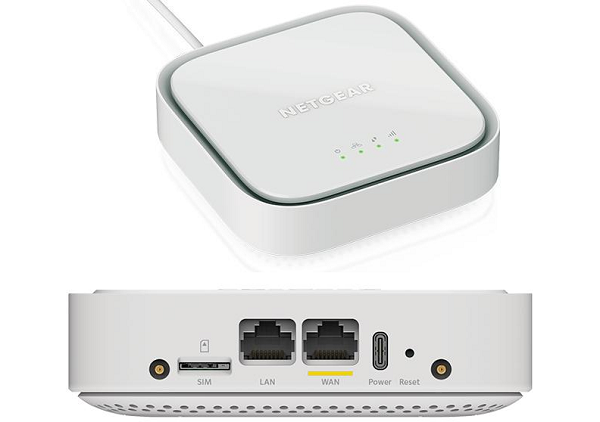
The single most important feature that sets the Netgear LM1200 apart is its dual TS9 ports for external antennas. While some niche or industrial modems offer this, it is a rarity in consumer-grade devices. This feature is a game-changer for anyone struggling with a weak signal.
An external antenna bypasses all the obstacles that kill a cellular signal, concrete walls, metal roofing, hills and trees, by capturing the signal outside and feeding it directly into the modem. This is where expertise matters. Campad Electronics are pioneers in the antenna industry, providing high-performance antennas for mobile broadband since Australia’s first 3G networks were launched. Their deep knowledge ensures that the antennas and accessories offered are perfectly matched to the LM1200.
Why this matters for you:
-
For Rural Users: A high-gain directional antenna, like the Building Mount 3G 4G and 5G Antenna Kit, can be aimed at a distant cell tower, transforming a one-bar signal into a fast, stable connection.
-
For Mobile Setups: A vehicle-mounted antenna, such as the Strike B3 4G 5G And 3G 7dBi Antenna, provides reliable internet for caravans, RVs and work vehicles by overcoming the signal-blocking effect of the metal body.
-
Crucial Connection: This system requires high-quality Patch Leads to connect the antenna to the modem's TS9 ports with minimal signal loss.
Most other modems leave you powerless against a weak signal. The Netgear LM1200 gives you the tools to actively solve the problem.
Differentiator 2: Superior Network Flexibility with Dual Ethernet Ports
Another key advantage of the Netgear LM1200 is its inclusion of two Gigabit Ethernet ports. Many basic 4G modems or hotspots offer only one port or rely solely on Wi-Fi. This dual-port configuration provides exceptional flexibility for different network setups.
The ports can be configured to function as either WAN (Wide Area Network) or LAN (Local Area Network). This allows the LM1200 to serve two primary functions that other modems cannot easily replicate.
1. As a Primary Internet Gateway: You can use one port to connect directly to your computer and the other to connect to a separate device, like a network switch or a smart TV. This is ideal for a small home office or temporary setup where you need more than one wired connection.
2. As a Seamless Failover Solution: This is where the LM1200 truly shines. You can connect your existing fixed-line modem (like NBN) to the LM1200's WAN port. Then, connect the LM1200's LAN port to your Wi-Fi router. If your primary internet service goes down, the LM1200 automatically switches to the 4G LTE network, keeping all your devices online without interruption. Most standard modems lack this sophisticated failover capability, leaving you to manually switch networks during an outage.
This feature provides invaluable peace of mind for anyone who relies on a constant connection for work, security systems or smart home devices.
Differentiator 3: Broad Carrier Compatibility
Many modems, particularly those supplied directly from a carrier, are "locked" to that specific network. This restricts your ability to shop around for the best data plan or switch to a provider with better coverage in your area.
The Netgear LM1200 is factory unlocked, meaning it is compatible with all major Australian carriers, including Telstra, Optus and TPG/Vodafone. This freedom allows you to:
-
Choose the carrier with the strongest signal at your location.
-
Take advantage of competitive data plans and switch providers as better deals become available.
-
Use different SIM cards when travelling to different regions to ensure optimal coverage.
This versatility ensures you are not tied to a single provider, giving you complete control over your service and costs. In contrast, locked modems force you to stay with one carrier, even if their service is subpar in your area.
The Netgear LM1200: A Clear Winner for Real-World Use
When you compare the features side-by-side, it becomes clear why the Netgear LM1200 is the superior choice for users facing real-world connectivity challenges.
| Feature | Netgear LM1200 | Typical Carrier Modem | Basic 4G Hotspot |
|---|---|---|---|
| External Antenna Support | Yes (Dual TS9 Ports) | No | Rarely |
| Ethernet Ports | Two (Gigabit, configurable) | One (LAN only) | Often none, Wi-Fi only |
| Failover Capability | Yes (Automatic) | No | No |
| Carrier Unlocked | Yes | No (Locked to provider) | Usually yes |
| Ideal Use Case | Primary or backup internet in any location | Basic home use with strong signal | Portable, personal use |
For anyone living in a rural area, working from a mobile office or needing a reliable backup internet solution, the choice is clear. The features that standard modems lack are the very ones that make the Netgear LM1200 so powerful.
Your Path to Unbeatable Connectivity
A modem is only one part of the equation. To truly unlock the potential of the Netgear LM1200, it should be paired with accessories from experts who understand the science of signal reception. With decades of experience, Campad Electronics provides a selection of antennas, mounts and patch leads that are tested and proven to deliver maximum performance.
Don't settle for a modem that limits your possibilities. Choose the Netgear LM1200 for its unmatched flexibility, power and reliability. Build a complete connectivity solution that solves your internet problems for good.